All-in-One Budget Planner
Every part of your money, income, bills, debts, savings, investments, in one beautifully organised Google Sheet, with an AI coach that tells you what your numbers mean.
Optional AI coach · all 7 themes · works in any currency · yours for life

- ⚡Instant accessDelivered in seconds
- ♾️One-time purchaseNo subscription, ever
- 🛡️30-day make-it-rightNot happy? We'll fix it
- 🔒Secure checkoutCard, Apple & Google Pay
- 30 tabs
- AI coach
- 📘 Setup guide
- Health Score
- 7 themes
- Any currency
- Yours for life
A two-minute tour of the whole planner.
Watch the dashboard fill itself in, switch a theme in one click, and meet the optional AI coach, all in one automated Google Sheet.
Seven looks. One file. Zero static.
Tap a colour below and watch the planner recolour in one click, switch as often as you like, your data never moves. All seven are included with every purchase.
Now showing the Sage Orchard theme, and every screenshot on this page changed with it.
A coach that reads your numbers, and tells you what to do.
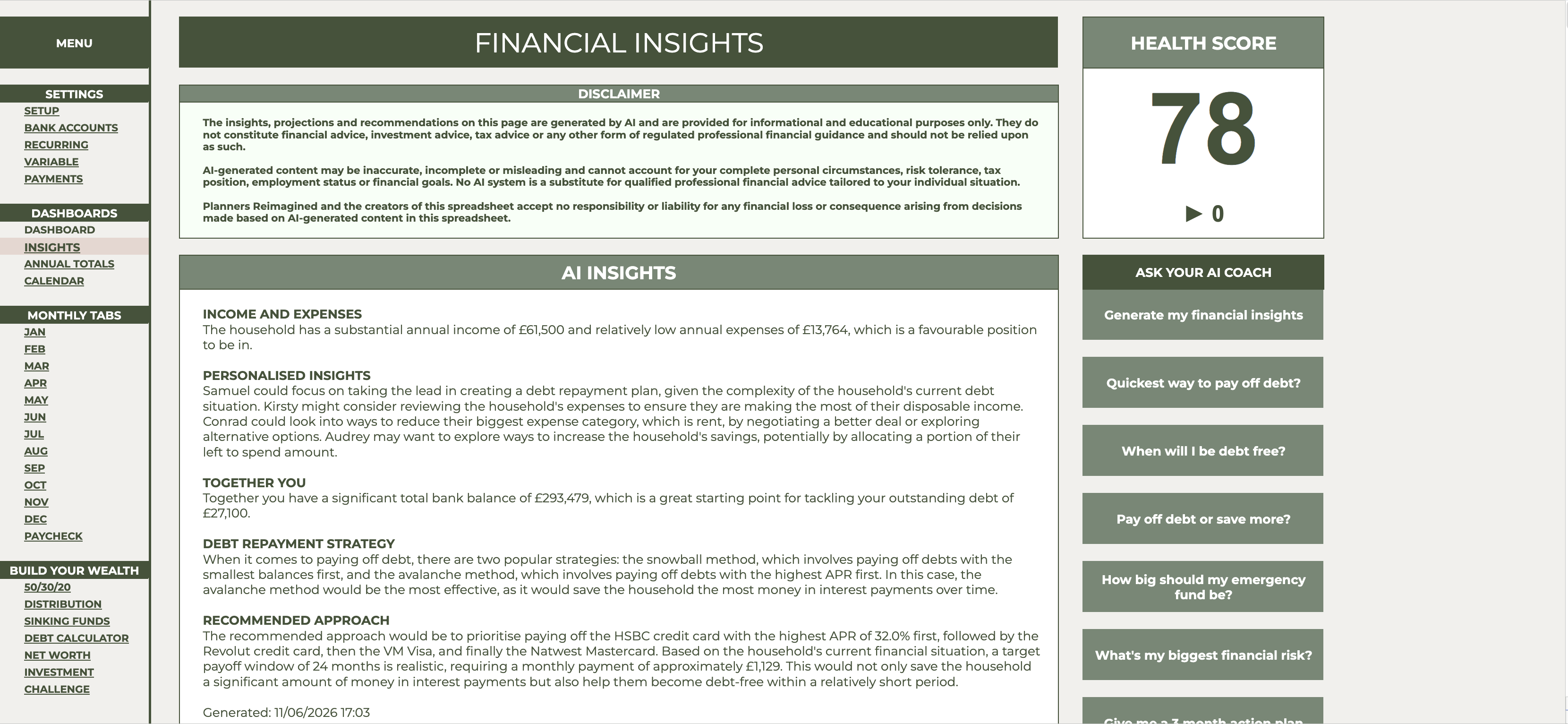
The Insights tab studies your real figures and writes you a plain-English report: where you stand, what's working, and the single most impactful move for the next three months, with a Financial Health Score out of 100 you can watch climb.
One tap, one answer. One-click questions are built in, "When will I be debt free?", "Pay off debt or save more?", "How big should my emergency fund be?", answered from your data, not generic advice.
Works with four AI providers (OpenAI, Claude, Gemini or Groq) using your own key, so there's no subscription, and only figures and first names are ever sent to generate your insights. Insights are educational guidance, not regulated financial advice.
Everything your money does, in one place.
You'll only touch a handful day to day, here's the tour.
That's the highlight reel, here's everything in the box.
Thirty tabs. Four sections. One menu.
Organised exactly like the planner itself, so you always know where you are, plus full written setup instructions and our online Getting Started guide.
Setup & transactions
- Instructions
- Setup
- Bank Accounts
- Recurring transactions
- Variable transactions
- Bill Payments
Dashboards
- AI Insights + Health Score
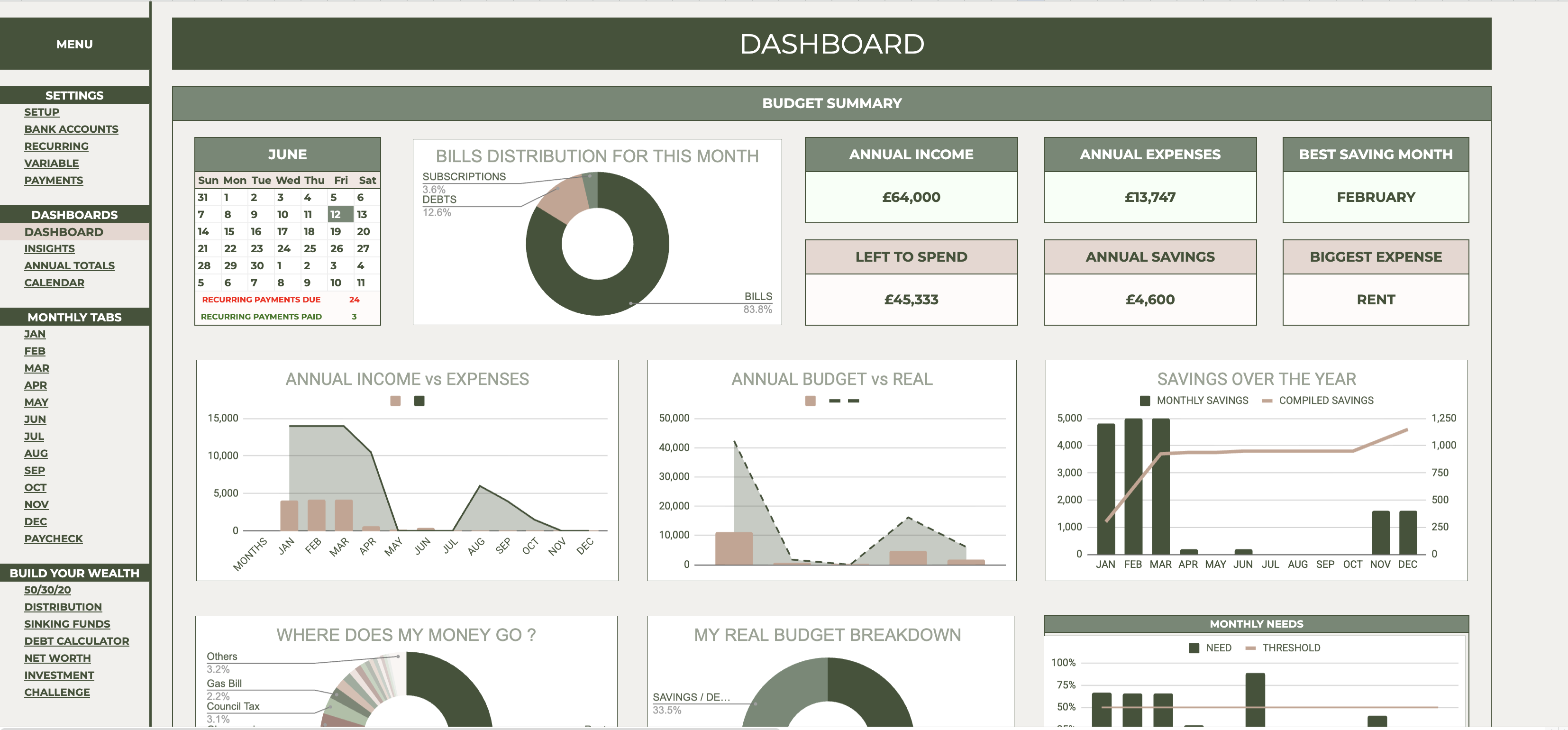
- All-in-One Dashboard
- Annual Totals
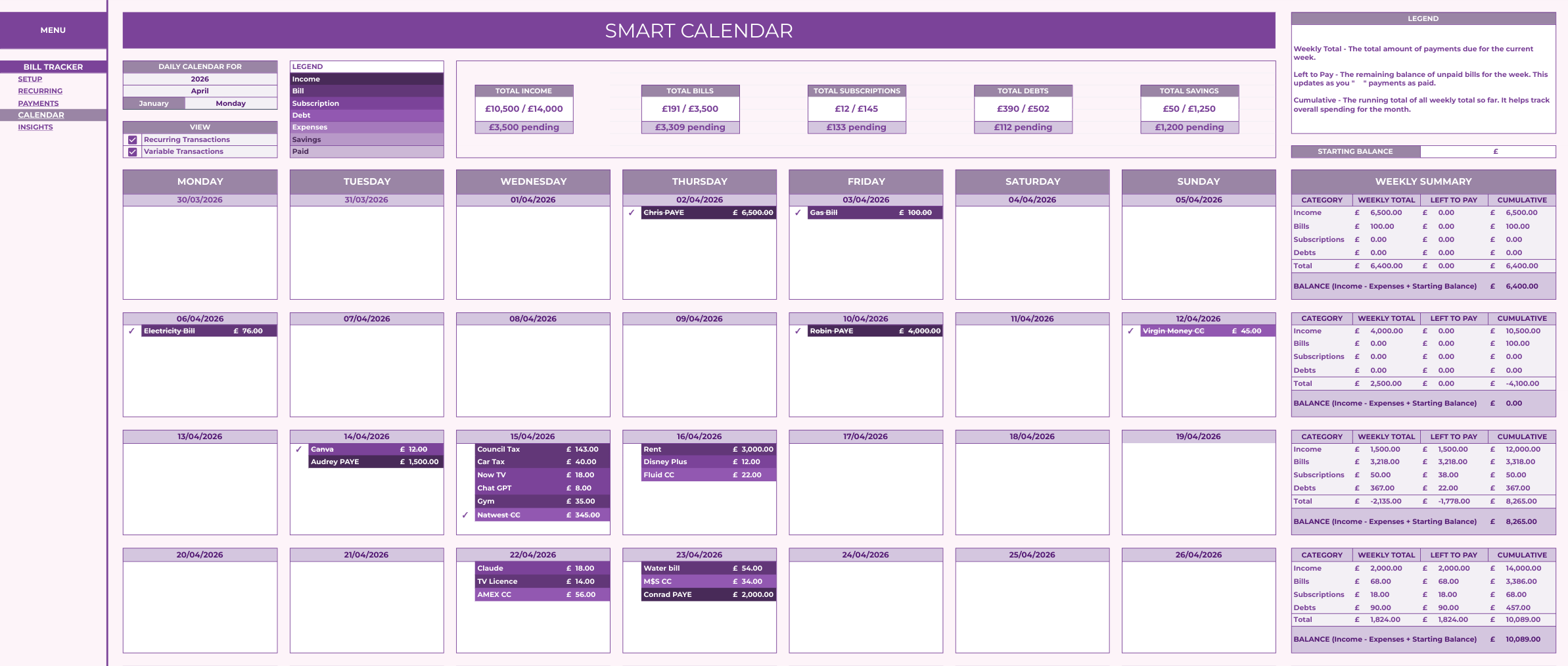
- Bill Calendar
Your year
- 12 monthly tabs (Jan–Dec)
- Paycheck Budget
Build your wealth
- 50/30/20 Budget
- Distribution
- Sinking Funds
- Debt Calculator
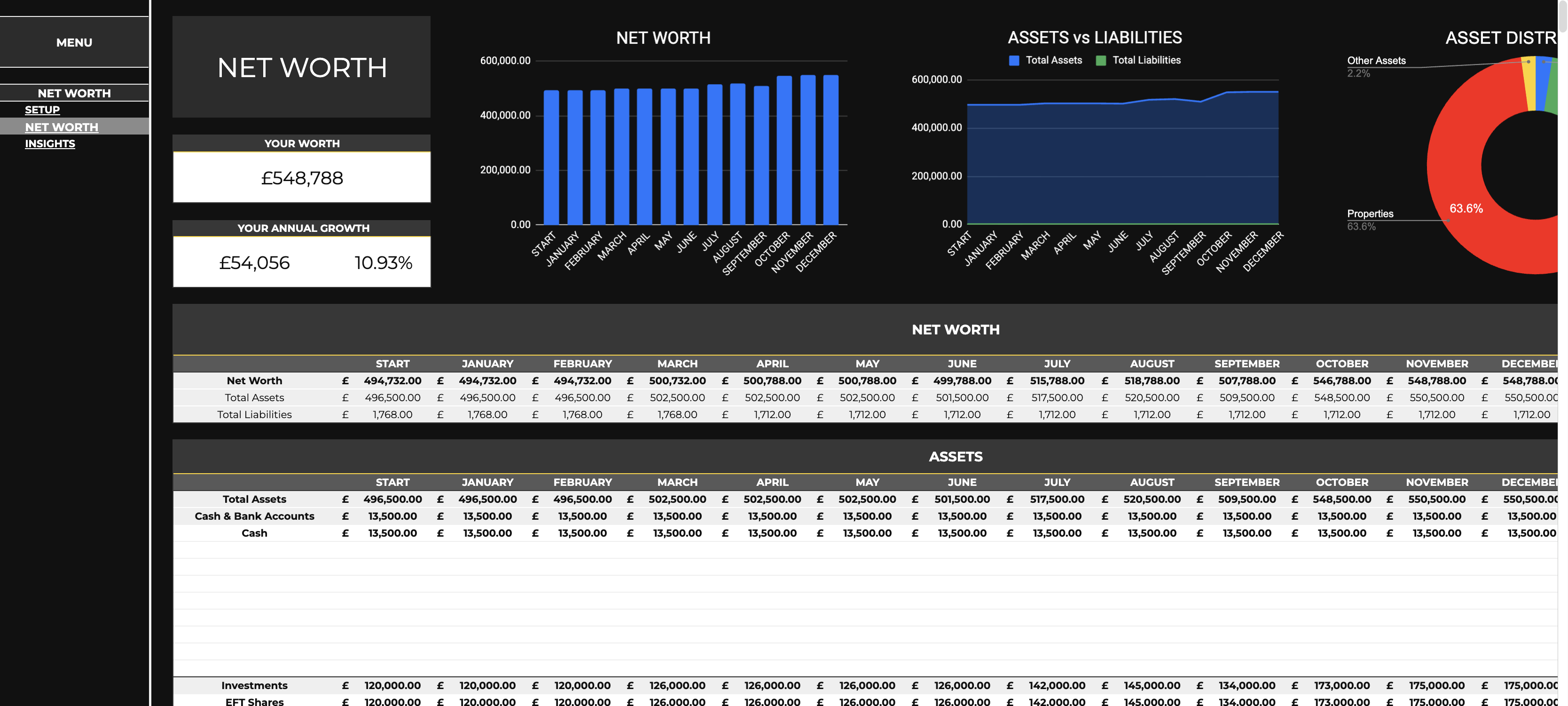
- Net Worth
- Investment tracker
- No-Spending Challenge
Unlike other budget planners, yours has an optional AI coach, the one thing a static template can never give you.
Three reasons families love it
Personalised guidance inside Google Sheets
No new app, no learning curve. Your coach lives in the spreadsheet you already know how to use.
One-time purchase, no surprises
No subscriptions, no recurring fees, no locked features. £19.99 once, yours for life.
Seven looks, one planner
From calm Sage Orchard to bold Midnight Grey, restyle the whole planner in one click whenever you fancy a change.
From purchase to planning in four steps.
Buy & download
Your link arrives instantly after checkout.
Make your copy
One click saves the planner to your own Google Drive.
Set up in minutes
Currency, dates and your household, our Getting Started guide covers everything, including the AI coach.
Plan with your coach
Log your first month and generate your first insights.
All you need
- A free Google account, the planner runs entirely in Google Sheets
- Any device: desktop, tablet or mobile
- A few minutes for one-time setup (our step-by-step guide covers it, including the AI coach)
- That's it. No software to install, nothing to subscribe to.
30-day make-it-right guarantee
If it's not right for you, tell us within 30 days and we'll make it right.
Your data stays yours
Your planner lives in your own Google account. The AI coach works through a provider you choose, and only ever sends figures and first names, never the full picture, and never to us.
Instant delivery
Your download link is in your inbox the moment you order.
Before you ask,
How does delivery work?+
Instantly. The moment your order completes you'll get a download link by email and on the confirmation page. Click it, choose Make a copy, and it saves to your Google Drive.
Do I need anything besides a free Google account?+
No. It runs entirely in Google Sheets on any device. No extra software, no subscriptions.
Do I need to be good with spreadsheets?+
Not at all. There's a step-by-step Setup Guide built into the sheet, open it any time, and tap “Show me where” to jump straight to the cell you need. It holds your hand through setup, so no spreadsheet experience is required.
Do you do Excel versions?+
Not at the moment, everything's built for Google Sheets, because that's what makes the AI coach possible (it runs on Google Apps Script, which Excel can't match). If there's enough demand we'd look at non-AI Excel versions down the line, so if that's what you'd want, do let us know, it helps us decide what to build next.
How do I set up the AI coach, and is it required?+
It's optional; the planner works without it. To switch it on, pick one of four providers, paste your own key, and click Generate. A few minutes, one time, with a step-by-step guide.
What AI platforms do you support?+
Four: OpenAI, Claude, Google Gemini and Groq. Pick whichever you prefer, paste in your own key, and you can switch provider whenever you like.
Do I have to pay for an AI licence?+
No. There's no AI subscription to us and no licence to buy. The coach runs on your own provider key, and several, like Google Gemini and Groq, offer free tiers that are more than enough. Prefer a paid tier? You'd pay the provider directly for what you use, but it's entirely optional.
Is my financial data private?+
Yes. Your planner lives in your own Google account. When you generate an AI report, only figures and first names are sent to the provider you picked, never the full picture, and never to us.
Can I really switch between all seven themes?+
Yes, all seven are built into the file, one click each. Change the look as often as you like; your data stays put.
What if it's not right for me?+
Tell us within 30 days and we'll make it right. We'd rather you plan happily than keep your money unhappily.
Complete your set
Built to be loved, and backed by us.
Every planner is tested to work perfectly out of the box, comes with a step-by-step setup guide, and is covered by our 30-day make-it-right promise. Your data always stays private in your own Google account.
- ✅ Tested to work out of the box
- 📘 Step-by-step setup guide
- 🛡️ 30-day make-it-right promise
- 🔒 Private, in your own Google account
The setup guide walked me through everything... up and running in minutes. The built-in AI gives me clear, personalised insights on the fastest way to pay off my debt, plus an actual projected payoff date that keeps me motivated.
Fantastic product! With a family of 5 this saved us! So easy to use! Wish I had found it sooner
Ready when you are.
Download it now, log your first month, and meet your coach tonight.
Get the planner for £19.9930-day make-it-right guarantee · instant download